
Canetas Touch para Tablet
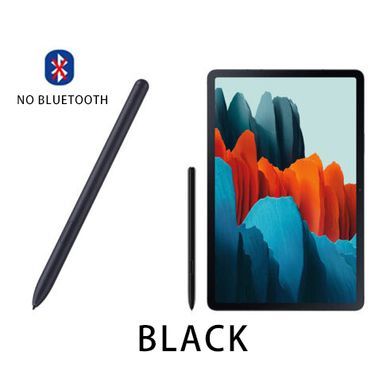
Caneta S Pen Touch preta de substituição sem Bluetooth para Samsung Galaxy Tab S6/S7/S8/S9

Caneta Stylus especial com carregamento magnético, anti-toque falso, tela sensível ao toque, caneta capacitiva para iPad

Caneta Stylus Essager para Apple Pencil 2 1 para iPad Air Pro Mini Acessórios Caneta de toque para tablet Lápis Stylus de carregamento sem fio

1 peça de caneta capacitiva para tela sensível ao toque para iPhone/Samsung/iPad Tablet multifuncional com tela sensível ao toque para celular

Caneta Stylus para Huawei Honor MagicPad 2 HONOR Pad X8a 8 9 X9 MatePad 11.5S Air 11.5" SE Tablet Tela Touch Pen Lápis

Caneta Stylus Ativa para iPad com Rejeição de Palma, Sensibilidade à Inclinação, Fixação Magnética e Compatível com Telas Sensíveis ao Toque.

Caneta Stylus Touch sem Bluetooth com 5 Pontas de Substituição para Samsung Galaxy Tab S6 S7+ S7 S8 S8+ S9 FE Ultra

Caneta Stylus Capacitiva Digitex Compatível com Tablets Huawei MatePad 11, V8/V7 Pro e Air 12 - Caneta para Desenho

Pontas para caneta stylus TABLIKE S para Samsung Galaxy S20 Ultra Tab S7/S8/S9/S10 FE Plus, ferramenta de remoção de pontas para caneta de tablet com tela sensível ao toque

Caneta Stylus para Honor X9a 2025 X8a 11 2024 GT Pro 12.3 2 12.3 Pad 9 X8 Lite MagicPad 13 Touch Smart Active Pencil
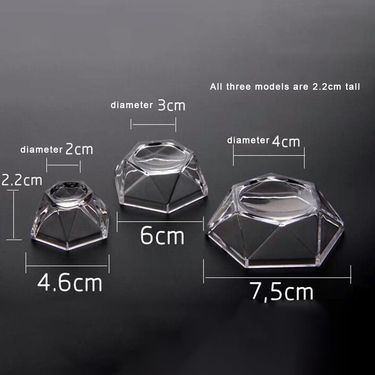
Suporte de esfera em formato hexagonal com base de cristal acrílico e pedra, suporte para exibição de estatuetas P/M/G, enfeites de mesa
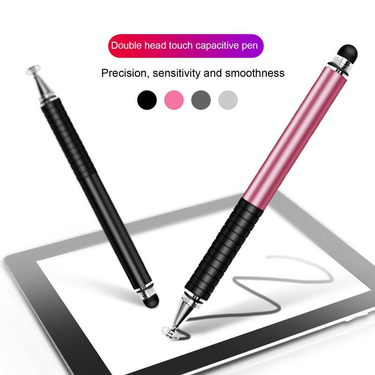
Caneta Stylus 2 em 1 Multifuncional Sensível Dual Touch Transparente Ventosa Suave Escrita Telefone Tablet Caneta Capacitiva Desenho

Tablet para Samsung S6/S7 Lite Stylus Galaxy Tab S6 Caneta de toque de substituição

Kit de 4 peças com ponta de desenho, fácil instalação, sem riscos, protetor de tela com deslizamento suave para Lenovo Precision Pen 3.

Caneta Stylus Profissional com Mola para Navegação Automotiva com Resistência e Tela Sensível ao Toque
4 peças de pontas de desenho, instalação fácil, sem arranhões, protetores de tela, deslizamento suave para canetas Lenovo Precision Pen 3

20 canetas stylus para smartphones, tablets e laptops - sem necessidade de bateria, design sem componentes eletrônicos

Bola de cristal 3D da lua, astronomia, galáxia, sistema solar, saturno, bolas luminosas, globo de vidro de neve, luz noturna para casa e mesa

Suprimentos para apresentaçãoTeaching Stick Online Class Finger Reading Stick Touch Screen Learning Machine Teaching Stick Indicador Stick Touch Writing Pen

Caneta Stylus Magnética 2 em 1 para Desenho, Tela Sensível ao Toque para iPhone, Samsung, Huawei, Xiaomi, Tablets e Smartphones
Tablet Stylus Pen: Draw, Note & Zoom Like a Pro
When you try to sign a document on your tablet while your finger smears the screen like a windshield in rain. You may need a stylus pen. What if your touchscreen could feel as precise as pen and paper? Enter tablet styluses—your secret weapon against fingertip frustration. Voghion will help you turn clumsy swipes into pixel-perfect control.
Finger Frustration? Why Smudges Sabotage Creativity
Fat fingers weren’t made for tiny buttons. Zooming maps leaves grease streaks. A precision touch screen stylus solves this with a fine tip that glides like ink.
Unlike your finger, it won’t obscure what you’re drawing or tap the wrong link. For artists, a bamboo stylus mimics pencil friction for natural shading. Adding a privacy screen protector and a tablet case may help you protect your ipad better.
Toolkit Essentials: Fine Tip vs. Brush vs. Hybrid
Not all styluses serve the same purpose:
· Fine tip pens excel at note-taking and precise selections
· Flexible stylus brush tips blend colors digitally like paint
· Dual-tip hybrids (e.g., pen + capacitive disc) switch between writing and scrolling
Note-Taking Nirvana: Palm Rejection Hacks
Resting your hand on the screen while writing shouldn’t create phantom scribbles. A palm rejection stylus communicates with your device to ignore everything except its tip.
Pair this with an E Ink tablet with stylus for paper-like battery life. Write naturally, mess-free. You can buy more cheap tablets in Voghion.
Avoid Junk: Battery vs. Passive Durability
Cheap universal stylus pens die fast or scratch screens. Two types dominate:
· Battery-powered active styluses (rechargeable) offer advanced features but need charging
· Passive styluses (no battery) work instantly but lack pressure sensitivity
For reliability, choose tablets with stylus ecosystems like iPad + Apple Pencil.
 4.4 de 5 com base em 9,249 avaliações