
Comandos de apresentação

Caneta multifuncional para virar páginas em PowerPoint com controle remoto, ideal para professores e compatível com quadros brancos e projetores a laser Seewo (modelo MA100).

Bluetooth 2.4g Dual Mode Multifuncional Wireless Ensino Escritório Carregamento Seewo Whiteboard Pointer Ppt Laser Page Turning Pen

Caneta de comando telescópica de aço inoxidável com clicker para apresentação, grande marca, caneta de comando para ensino, entretenimento, aventura ao ar livre, vendas de comando

Caneta eletrônica para quadro branco multimídia quadro negro inteligente ensino tudo em uma máquina demonstração escrita professor palestra caneta

Apresentação Clicker Caneta de Virar Página Gravável Professor Multifuncional PPT Controle Remoto Xiwo Quadro Branco Eletrônico Ensino Tudo em Um Conferência

Caneta apontadora telescópica de 1 metro para quadro branco eletrônico, ideal para ensino e materiais de escritório.

Suprimentos para apresentação Caneta Stylus Felck Caneta inteligente para virar páginas Ensino Conferência Quadro branco eletrônico tudo em um Caneta inteligente Escrita por toque

Apresentação Clicker Aço Inoxidável Telescópico Ponteiro Visão Leitura Teste de Visão Gráfico de Visão Optometria Caneta Bastão Ponteiro Caneta Telescópica
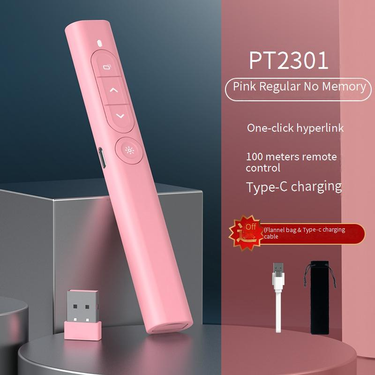
Novo apontador de quadro branco Seewo multifuncional sem fio para ensino, discurso, caneta laser para virar páginas
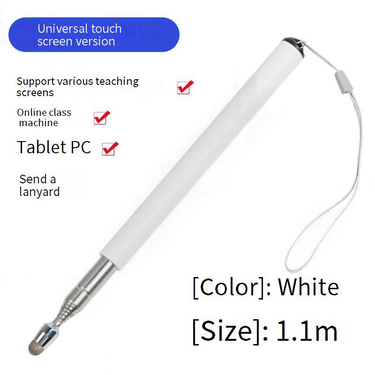
1 metro telescópico ensino vara caneta ensino vara bastão eletrônico quadro branco caneta toque aprendizagem máquina caligrafia

Máquina de ensino multifuncional, caneta para virar páginas, caneta multifuncional para ensino e palestras, tudo em um, caneta apontadora
Command the Room: Your Guide to the Perfect Presenter Remote
Standing in front of a room is hard enough. Fumbling with a mouse or trapped behind a laptop makes it worse. A presenter remote frees you. You can move, gesture, and connect with your audience. But not all remotes are built the same.
Whether you're a keynote speaker commanding a stage, a teacher managing a lively classroom, or a first-time presenter on a budget, there's a perfect clicker waiting. Here's how to find yours.
For the Professional Speaker: Command Every Corner
You're on a big stage. Your audience is watching. You need to move with confidence. A wireless presenter remote for PPT is your essential tool. You want a PPT clicker wireless that works from the back of the room.
Look for a presentation remote control with a strong range. A slide advancer remote lets you walk through your points naturally. You're not tied to the podium. You can point at visuals with a presenter remote with laser pointer. The laser presentation remote highlights your key data. It's not just a clicker; it's your mobile command centre. You own the room.
For the Everyday Educator: Simplify Your Workflow
You're a teacher or a trainer. You move between a whiteboard, a projector, and your students. You need a remote that's simple and reliable. A USB presenter remote plug and play is your best friend. Plug the tiny receiver in, and it works instantly.
No drivers, no fuss. A no software presenter remote saves precious minutes. You spend less time on tech and more time teaching. Pair it with a teaching pointer stick telescopic for physical boards. The retractable teaching pointer extends to reach the top of a whiteboard. It collapses to fit in your pocket. This combo covers digital slides and physical boards. For additional classroom tools, explore our selection of Paper & Cardstock.
For the Budget-Savvy Starter: Quality That Won't Break the Bank
You're a student or a new employee giving your first presentation. You need the basics without the premium price. A presenter remote with laser pointer at an entry-level price gives you the core tools. A simple presentation clicker laser allows you to advance slides and point. It's everything you need.
Look for a mini presenter remote portable that's small enough to slip into a pencil case. The compact presentation remote is easy to carry. It might not have the range of a pro model, but for a standard meeting room, it's perfect. It's your first step to a confident presentation. Pair it with a quality Fountain Pens for taking notes.
For the Modern Classroom: The Digital Touch
Your classroom has a smart board or a tablet. You need to write and navigate. A stylus pen for whiteboard teaching is your solution. The touch screen stylus teaching pen works on interactive displays. Use it for writing notes or tapping through slides.
A digital whiteboard pen is precise and responsive. It's a natural companion to your presenter remote. You can use the stylus for control on the screen and the remote for advancing slides from a distance. You're fully equipped for any lesson. Find more electronic tools in our Office Electronics range.
You have the message. Now get the tool that delivers it with confidence.
- Complete your presentation setup with our Office Electronics, Fountain Pens, and Paper & Cardstock.