
Equipamentos de transmissão de rádio e tv

Hitech 2 em 1 sem fio Bluetooth-compatível 5.0 AUX áudio receptor transmissor adaptador para TV
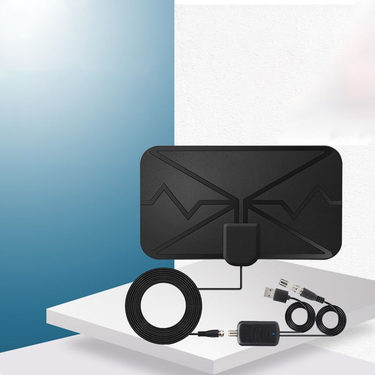
Hitech TV Mini 300 milhas de alcance 4K antena digital de alto desempenho para casa

Substituição de controle remoto IR universal Hitech para TV LCD inteligente Samsung BN59-01178W

Hitech 1 conjunto h96 max v12 smart tv-box banda dupla wifi 4k suporte compatível com hd

Hitech estéreo macho 3.5mm jack para microfone xlr áudio 3 pinos macho/fêmea cabo para hdtv
Broadcast Equipment: The Core Comparison for Content Creators and Professionals
The term "broadcast equipment" used to evoke images of massive studio consoles and satellite trucks. Today, it is a diverse ecosystem of tools that can fit on a desk or in a backpack. From a wirele microphone for a YouTube interview to a portable audio interface for a podcast, the range is vast. But the core question remains the same: which device is right for your specific broadcast need? The answer lies in three key attributes: portability, audio quality, and connectivity.
The Audio Capture Battle: Wireless Mic vs. Audio Interface
The foundation of any broadcast is clear audio. The choice between a wirele microphone system and an audio interface hinges on your environment.
- Wireless Microphone System: a wirele lavalier microphone clips onto a speaker's collar. It transmits audio wirelessly to a receiver plugged into your camera or computer. Best for: Interviews, vlogging, live streaming, and any scenario where the subject is moving. The trade-off: Potential for interference and battery drain.
- Audio Interface: A USB audio interface connects professional microphones (like a XLR condenser mic) to your computer. It offers pristine audio quality, phantom power, and multiple inputs. Best for: Podcasts, voiceovers, studio recordings, and multi-host shows. The trade-off: Tethered to a desk; not portable for field recording.
The Verdict: Choose a wirele microphone system for mobility and convenience. Choose an audio interface for uncompromising audio fidelity in a studio setting.
The Visual Capture Showdown: PTZ Camera vs. Webcam vs. Camcorder
Broadcast video has three main contenders, each excelling in different scenarios.
For a small studio podcast, a high-quality streaming webcam is often sufficient. For a church or larger venue, a PTZ camera offers professional coverage with minimal operator effort. For a wedding or event, a dedicated camcorder remains the most reliable tool. Please explore Tv Antenna for all your signal reception needs.
The Signal Chain: Capture Card vs. No Capture Card
A frequent point of confusion is whether you need a video capture card. If you are using a webcam, you do not. The webcam connects directly via USB. But if you are using a professional camera (DSLR, mirrorless, or camcorder) for streaming, you need a capture card to convert the HDMI signal into a format your computer can understand. A USB 3.0 capture card is the standard solution. It allows you to use your high-quality camera as a streaming webcam.
The Verdict on Connectivity
- USB Plug-and-Play: Webcams and USB microphones. The simplest and most reliable for beginners.
- HDMI + Capture Card: Professional cameras. Offers the best image quality for streaming but requires an extra device.
- XLR + Audio Interface: Professional microphones. The gold standard for audio but requires a higher investment.
A Cheat Sheet for Your Scenario
For high-quality audio capture, consider using Professional Audio Recording equipment to elevate your broadcast. For live events and installations, a reliable Public Address System Installation Sound solution will ensure your message is heard clearly.
Final Thought
The best broadcast equipment is not necessarily the most expensive. It is the kit that matches your specific workflow. Do you need to move around? Choose wireless audio and a camcorder. Do you sit at a desk? Choose an audio interface and a high-end webcam. Do you need to control a camera remotely? Choose a PTZ. The right combination will elevate your production value without overwhelming your setup or your budget. Start with the signal you need most—audio or video—and build from there.