Visão completa
Itens similares
Conjunto de teclado e mouse sem fio Bluetooth recarregável com 109 teclas retroiluminadas RGB e layout do Reino Unido.
153,20€
243,74€ -37% DESLIGADO

Laptop desktop computador com fio USB jogos optoeletrônicos esportes home office externo CF mouse
21,00€
23,23€ -9% DESLIGADO
Mais vendido: teclado e mouse com fio ABS de 104 teclas, conjunto de duas peças, jogo de digitação silencioso para escritório e laptop
20,21€
28,97€ -30% DESLIGADO
Novo Mouse Sem Fio Recarregável Vertical 2.4G com Sensação Mecânica para Jogos e Escritório - Silencioso (Atacado)
32,84€
48,09€ -31% DESLIGADO
Mouse optoeletrônico para jogos Youbat GM02 com fio, luz de respiração luminosa de 7 teclas, configuração de computador com tecla de fogo
32,68€
49,52€ -34% DESLIGADO
Dongdong RGB Brilhante Macro Programação Jogos 6 Botões Luz-controlável Vários Mouse com Fio
38,70€
52,66€ -26% DESLIGADO
Mouse sem fio HXSJT300 2.4G com bateria recarregável de 600 mA e 2400 dpi ajustável
42,03€
64,71€ -35% DESLIGADO
Mouse dobrável de toque óptico de computador 2.4G de segunda geração sem fio
67,02€
96,74€ -30% DESLIGADO
Xinweiqing Universal PC Computador Notebook Óptico 1200DPI Mini 2.4G Wireless Touch Mouse
20,86€
31,23€ -33% DESLIGADO
Mouse sem fio com bateria, modelo unissex, silencioso, para laptop, computador desktop, escritório e jogos. Fabricante atacadista.
27,75€
33,60€ -17% DESLIGADO
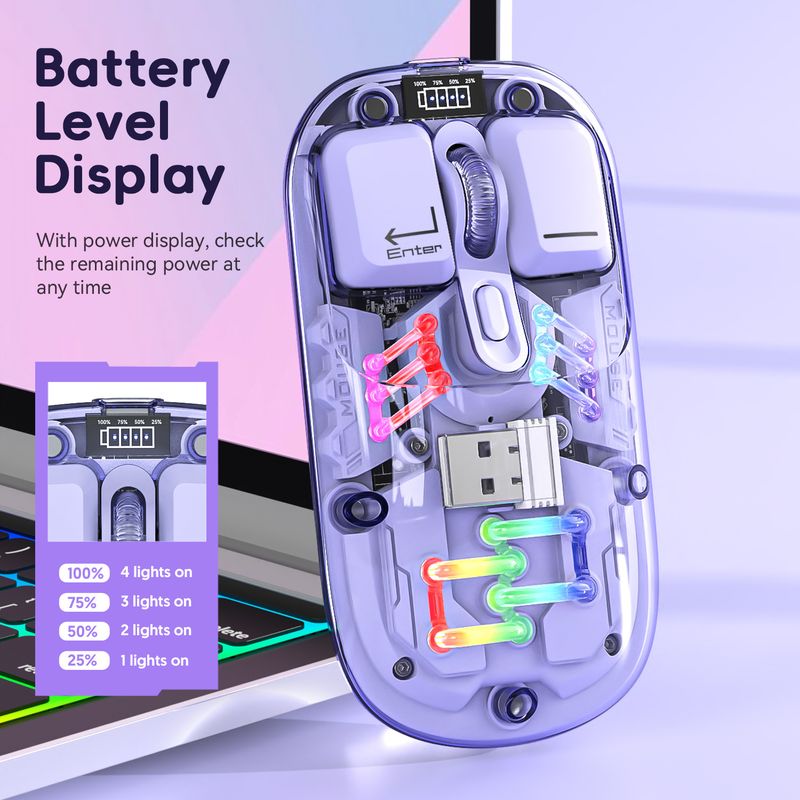
Mouse recarregável sem fio transparente T200 de modo duplo 2.4G/Bluetooth 5.0 com design magnético e iluminação RGB. Disponível em estoque.
63,62€80,36€
Cor : T200 Juvenil Rosa Modo Duplo

Quantidade :

Relatório
Incluir violação de direitos autoraisFrete padrão grátis. Veja detalhes
Estimado entre Mon, Aug 3 e Sat, Aug 8
Você pode devolver o produto em até 30 dias após o recebimento. Veja detalhes
Compre com confiança

Garantia de devolução do dinheiro
Receba o item que você pediu ou seu dinheiro de volta. Saber mais
Sobre este item
Fonte: CoreBox
O vendedor assume toda a responsabilidade por este anúncio.Número de item: 36206436
Especificações dos itens
Origem
DE
Características
Fosco, Outro, Rgb
Eixo
Outros, Eixo Óptico, Eixo Verde
Teclado numérico
Sim não
Tipo de Produto
Mouse recarregável, mouse portátil, mouse mudo
Conexão
Sem fio, Bluetooth, Outros
Tamanho
100Mm-120Mm, 121Mm-130Mm, <100Mm
Certificação
CE, UL, PONTO
Descrição do item do vendedor
Dimensions, weight, and packing quantity of T200:
Cord length: 30cm
Product weight: 72g
Product dimensions: 11.3x5.8x2.5cm
Packaging weight: 115g
Packaging dimensions: 12.3x7.5x3.5cm
Quantity per box: 60pcs
Packing dimensions: 37.5*26*28cm
Packing weight: 7.2kg
T200 dual-mode wireless mouse selling points:
Dual-channel 2.4G+Bluetooth connection, supports simultaneous connection to 2 devices, allowing for easy switching between them
Made of transparent PC material, with a clear and luminous appearance, showcasing a high-end texture, making you stand out in the office
3.Built-in 1600dpi three-speed adjustable sensor, precise operation, smooth scrolling, enhancing work efficiency
4.5 million times micro switch, mechanical keycap design, matte texture, fast rebound, and fast response
5.Multiple RGB lighting modes, full of personality, creating a cool desktop atmosphere, making your workspace more vibrant
charging, eliminating the hassle of tangled charging cables, making
more convenient use
7.Built-in 400mAh large-capacity lithium battery, strong e
Endurance, no need for frequent charging during long-term use, making your office life more convenient and worry-free
Product parameters:
Product model: T200 dual-mode wireless mouse
IC model: PixArt3065
Return rate: 125HZ
Connection method: 2.4+BT5.0
Lighting mode: RGB backlight 11 lighting modes
Mobile speed: 28IPS
Refresh rate: 3000FPS
Acceleration: 10G
Number of buttons: 4 keys
Key lifespan: 5 million times
Operation mode: photoelectric
Battery type: Built-in 400mAh rechargeable lithium battery
DPI: 800-1200-1600 dpi
Mouse material: fully transparent PC material
Roller material: silicone
Battery display: 4-bar battery display key can be switched
Wireless distance: 10 meters
Charging interface: Type-C interface
Charging cable length: 30cm
Product size: 11.3x5.8x2.5cm
Product weight: 72g
Packaging size: 12.3x7.5x
3.5cm
Packaging weight: 115 g
Package includes :
1 x 2.4G+BT5
.0 Wireless Mouse
1 x USB Receiver
1 x Type-C Charging Cable 30CM
1 x Instruction manual
Operating systems:
Windows Vista
yes, Win7/8/10/11, ac OS X10.5 and later
Light operation:
Turn on the mouse switch, after successful connection, press the bottom button
of mouse Lighting mode switch key turn on the light mode
11 + 1 lighting modes can switch the light effectPress and hold
To turn off the light mode, press and hold to switch 11 light
effects
2.When there is no action on the mouse within 10 minutes, the mouse
will enter standby mode and all lights will be turned off
3.After entering sleep mode, press any key to re-enter connection and
The lights will automatically turn on
Installation and use steps: lower schematic:
12.4G wireless connection method:
Switch the button to 2.4G mode, plug in the USB receiver, the blue light is flashing, the mouse can be used. Power off when the switch is in the center position
position
2BT5.0 wireless connection method:
Switch t
Switch the BT mode button to BT, the blue light is flashing, the PC will automatically search for BT5.0 and confirm it, then it can be used; if you want to connect another PC, please switch the BT mode again and press the left button
Press the middle key for 3 seconds at the same time, the PC will search for the BT signal and choose to connect


Vídeos
Vídeos para este produto